
For most of analytics history, tracking lived in the browser. A tag fired in the visitor’s page, collected some data, and shipped it off to whatever platform you used. Simple — and increasingly fragile.
Ad blockers strip out those tags. Browsers limit what scripts can store. Privacy rules demand tighter control over what leaves the page. In response, more teams are moving collection out of the browser and onto a server they control. That approach is server-side tracking.
This guide explains what server-side tracking is, how it differs from the browser-based model, and the honest trade-offs involved. It’s not a magic fix, but for the right team it solves real problems. Let’s break it down without the jargon.
What Is Server-Side Tracking?
Server-side tracking means collecting and processing analytics data on a server you control, rather than directly in the visitor’s browser. Instead of a dozen vendor scripts firing on the page, the browser sends data to your own endpoint first. That server then decides what to forward, to whom, and in what shape.
Think of it as adding a checkpoint between your website and your analytics tools. The browser still triggers events, but the data passes through your server on its way out. You become the gatekeeper.
Client-Side vs. Server-Side
To understand the shift, compare the two models directly.
| Aspect | Client-side (browser) | Server-side |
|---|---|---|
| Where data is collected | In the visitor’s browser | On your own server |
| Vendor scripts on page | Many | Few or one |
| Affected by ad blockers | Often | Less so |
| Data control | Limited — vendors see raw data | High — you filter before sending |
| Setup complexity | Lower | Higher |
Notice that server-side isn’t strictly “better.” It trades simplicity for control. Whether that trade makes sense depends entirely on your needs, which we’ll get to shortly.
How Server-Side Tracking Works
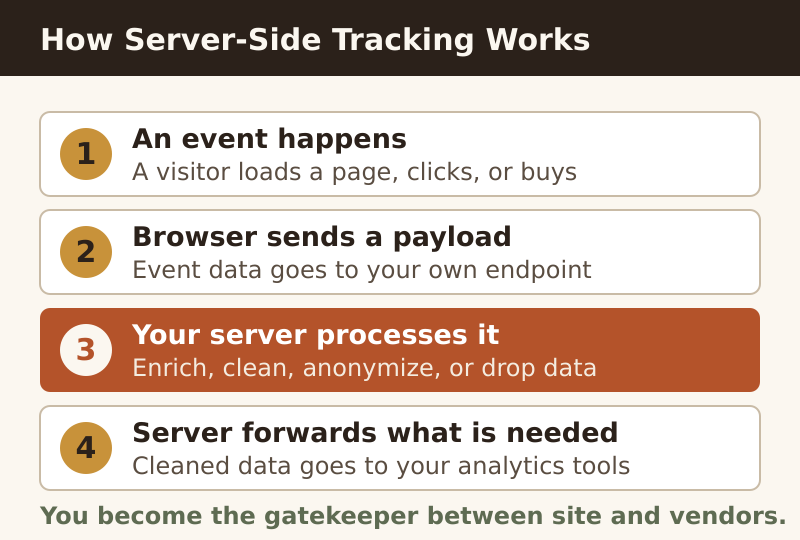
The mechanics are easier to follow as a sequence. Here’s the typical flow, step by step.
- An event happens. A visitor loads a page, clicks a button, or completes a purchase.
- The browser sends a small payload. Instead of calling many vendors, it sends event data to your own collection endpoint.
- Your server receives and processes it. Here you can enrich, clean, anonymize, or drop data before it goes anywhere.
- The server forwards what’s needed. Cleaned data is sent to your analytics platforms through their server-side interfaces.
The key change is in step three. Because the data passes through infrastructure you own, you decide what gets shared. You can strip personal details, respect a visitor’s consent choices, and avoid sending raw data to third parties you’d rather not hand it to.
Why Teams Move Server-Side
The motivations cluster around a handful of recurring pain points. If several of these resonate, server-side is worth a serious look.
- Data accuracy: Ad blockers and browser limits eat into browser-based tracking. Moving collection server-side recovers some of that lost data.
- Performance: Fewer scripts in the page means faster loads and a lighter browser footprint.
- Privacy control: You can filter, anonymize, or block personal data before it ever reaches a third party.
- Security: Fewer external scripts running in the page reduces the surface for malicious code.
That privacy angle is increasingly the deciding factor. When you control the server, you control the data flow. Combined with a clear cookie consent setup, server-side tracking lets you honor a visitor’s choices at the point where data actually leaves your control.
The Honest Trade-Offs
Now for the part vendors gloss over. Server-side tracking isn’t free, and it isn’t simple. Before you commit, weigh the costs.
- It costs money to run. A server-side endpoint needs hosting, and that hosting has to scale with your traffic.
- It needs technical skill. Setup and maintenance demand more engineering involvement than dropping a snippet on the page.
- It adds a point of failure. If your collection server goes down, data collection stops until it’s back.
- It doesn’t bypass consent law. Moving data server-side changes where processing happens, not whether you need permission to process personal data.
Server-side tracking gives you control over your data. It does not give you permission to ignore privacy law. The legal obligations follow the data, not the technology.
When to Use It (and When Not)
So who actually benefits? The answer depends on scale, sensitivity, and skill.
Good Candidates
- Sites with significant traffic where lost data has real business impact.
- Teams with strict privacy requirements that need tight control over data flow.
- Organizations with the engineering resources to build and maintain the setup.
- Businesses in regulated industries handling sensitive information.
Probably Overkill
- Small sites where browser-based tracking already gives you enough insight.
- Teams without the technical capacity to maintain a server reliably.
- Projects where a simpler, privacy-friendly analytics tool would solve the same problem more cheaply.
For many smaller sites, a lighter approach delivers most of the benefit. A privacy-respecting analytics platform that doesn’t rely on invasive cookies often removes the very problems people hope server-side will fix — without the operational burden. The right tool depends on the size of your problem, not the size of the hype.
Key Takeaways
Server-side tracking is a powerful tool for the teams that need it, and unnecessary complexity for those that don’t. Keep these points in mind:
- It collects and processes data on a server you control, instead of directly in the browser.
- The main wins are accuracy, performance, privacy control, and security.
- The trade-offs are cost, complexity, and a new point of failure.
- It changes where data is processed — it does not remove your consent obligations.
- Big, privacy-sensitive sites benefit most; small sites are often better served by a simpler tool.
Ultimately, server-side tracking is about control over your own data flow. If that control solves a real problem you have, it’s worth the investment. If it doesn’t, a lighter, privacy-first setup will serve you just as well — and let you sleep better.