
Every analytics tool sorts your visitors into a handful of buckets — organic, referral, paid, direct — and presents the result as if it were a fact. It is closer to a best guess. Understanding how that guess is made changes what you do with the report, and it explains the number that confuses everyone: why “direct” is so large.
The sorting rests on one piece of information the browser may or may not send. Once you know what that piece is and when it goes missing, the whole traffic sources report becomes readable rather than mysterious.
It All Rests on the Referrer
When someone clicks a link to your site, the browser can send along the address of the page they came from. That value is the referrer, and it is the single input most source classification depends on.
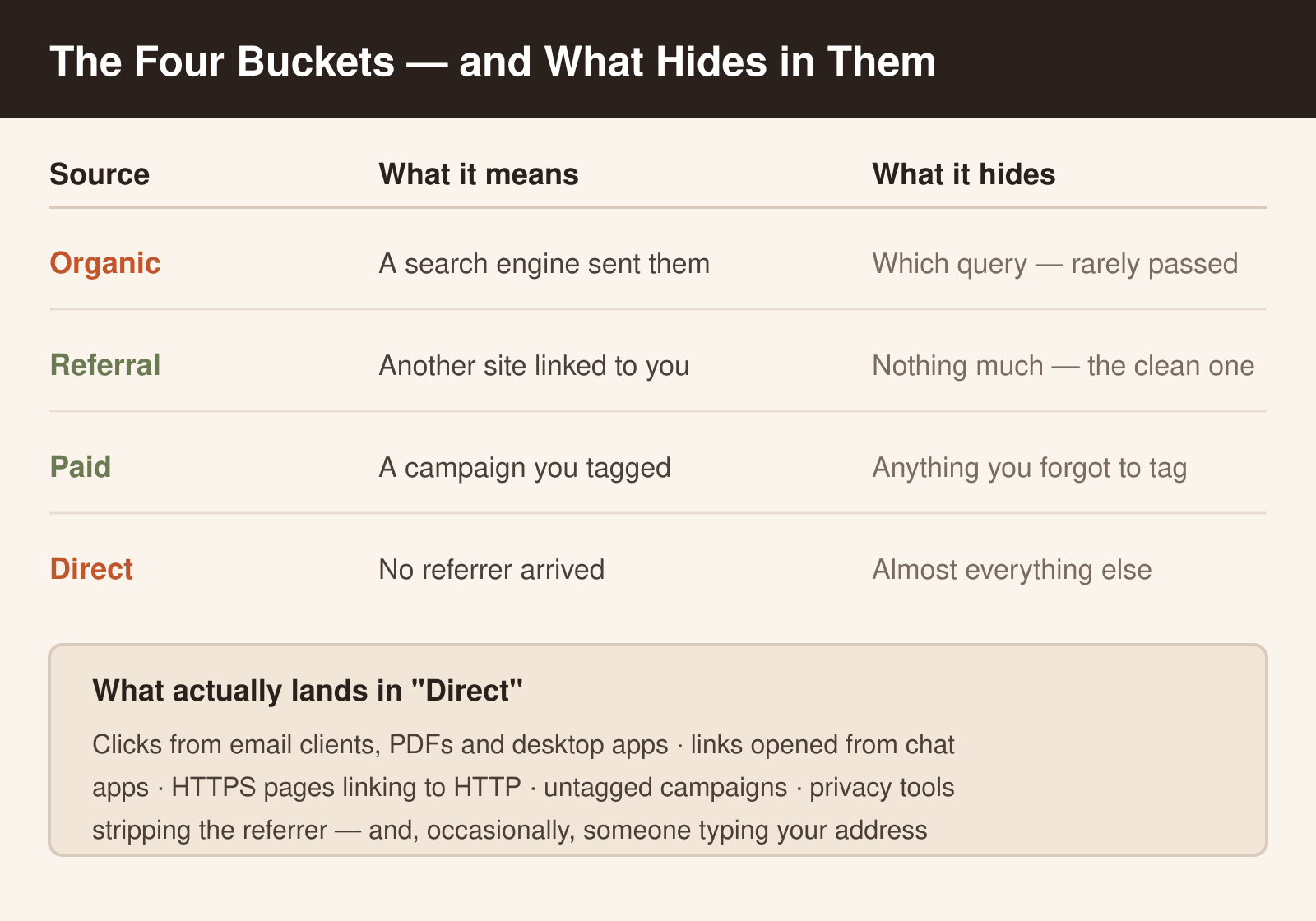
If the referrer is a search engine, the visit is organic. If it is another website, it is a referral. If your URL carries campaign tags, those take priority and the visit is attributed to the campaign regardless of where it came from. And when there is no referrer at all, the tool has nothing to work with, so the visit falls into direct.
Direct is not a source. It is the absence of information — a residue bucket for every visit the browser did not explain.
Why Direct Is Always Too Big
Almost nobody types your address into a browser. Yet direct routinely accounts for a fifth or more of traffic on sites that have no reason to be memorised. Here is where those visits genuinely come from.
Clicks from outside a browser lose the referrer entirely — a link in a desktop email client, a PDF, a Word document, a chat app, a native mobile app. The browser opens your page with no history to report, so the visit arrives naked.
Then there is the HTTPS-to-HTTP rule. A secure page linking to an insecure one withholds the referrer by design. This mattered enormously a few years ago and still catches sites that have not finished moving to HTTPS.
Privacy tooling adds more. Browsers, extensions and privacy modes increasingly trim or strip the referrer, and some platforms deliberately hide where their traffic came from. None of that is a fault in your setup — it is the modern web behaving as designed.
The last cause is the only one you control: untagged campaigns. A newsletter or a social post without campaign tags arrives with either no referrer or a useless one, and the work you paid for gets filed under direct where nobody can credit it. That is the gap UTM parameters exist to close.
What Organic Does Not Tell You
Organic traffic has its own blind spot. The referrer identifies the search engine but almost never the query, because search engines stopped passing keywords to analytics tools years ago. Your analytics can say a visit came from a search; it cannot say what was searched for.
That information lives in the search engine’s own console instead — Search Console for Google, and the equivalent tools elsewhere. Treat the two systems as answering different questions: your analytics tells you what visitors did after arriving, the search console tells you what brought them. Neither replaces the other, and trying to reconcile their numbers exactly is a waste of an afternoon, since they count different things over different windows.
Reading the Report Without Fooling Yourself
Three habits make the source report useful rather than decorative.
- Tag every campaign, every time. If a link appears in an email, an ad or a social post, it gets campaign tags. This is the only lever that moves traffic out of direct and into a bucket that credits your work.
- Read direct as a floor, not a figure. Some of it is genuine loyalty and some is measurement loss. Watching the trend is fair; treating the absolute number as “people who know our brand” is not.
- Compare like with like. Source data is most useful in relative terms — this month against last, this campaign against that one. Absolute cross-tool comparisons will not agree, and chasing that agreement teaches you nothing.
It is also worth knowing that privacy-first tools often classify sources slightly differently from Google Analytics, particularly around what counts as a session boundary. If you are moving between tools, expect the split to shift even when the underlying traffic has not — the same caution that applies when reading last-click attribution.
Where to Start
Open your source report for last month and look at direct as a share of the total. If it is above roughly a fifth, your first move is not analysis — it is tagging. Find the three links you publish most often outside your own site and add campaign parameters to them.
Check the same report a month later. The share of direct should fall, and the traffic it was hiding will appear somewhere you can actually act on.